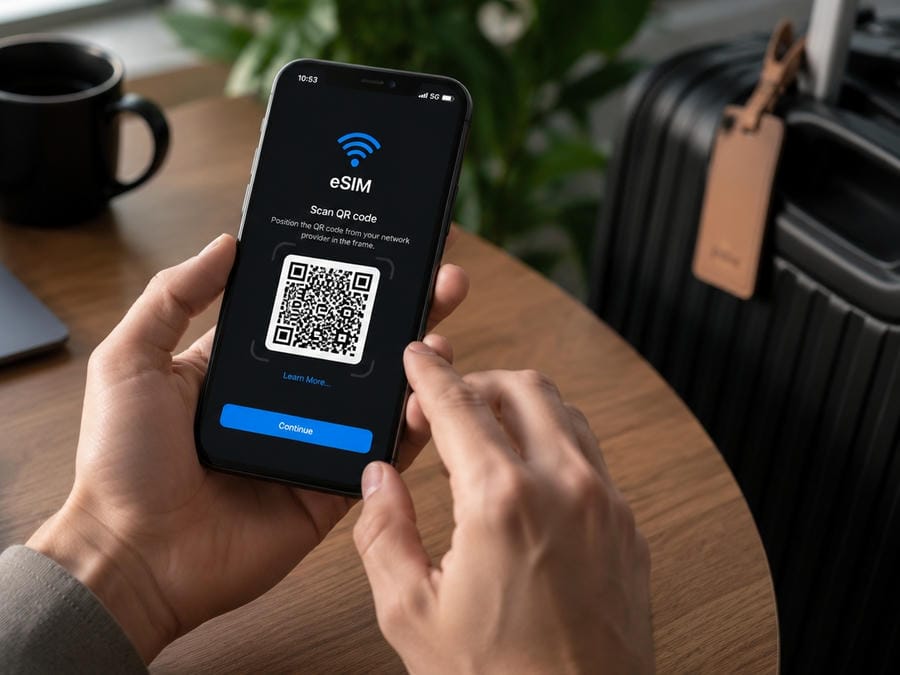
This China eSIM guide explains how foreign visitors can choose and set up mobile data before traveling to mainland China. A China eSIM can be the easiest way to get online after landing, but the best choice depends on your phone, trip length, app needs, budget and whether you need a Chinese phone number.
For the full internet setup overview, start with our guide to China eSIM and internet access: China eSIM and internet guide
China eSIM guide: the short answer
For most short-term visitors, a China eSIM is worth preparing before departure if:
- your phone supports eSIM;
- your phone is unlocked;
- the plan clearly covers mainland China;
- the data allowance matches your trip;
- you do not need a Chinese phone number;
- you can keep your home SIM active for SMS verification;
- you install and test the eSIM before your flight.
A travel eSIM is usually best for mobile data. It is not always best for local calls, local SMS, app registrations that need a Chinese number, or long stays.
What is a China eSIM?
An eSIM is a digital SIM profile installed on your phone. Apple describes eSIM as a digital SIM built into iPhone that can remove the need for a physical SIM card and make it easier to activate plans digitally, especially for international travel.
For China travel, an eSIM usually means a travel data plan that lets your phone connect to a mobile network in mainland China. Many travel eSIMs are data-only. They may not provide a Chinese phone number.
Is a China eSIM the best option for tourists?
For most short trips, yes. A China eSIM is often the easiest first option because you can buy and install it before arriving.
It is especially useful if you need mobile data for:
- Alipay and WeChat Pay;
- maps;
- translation;
- ride-hailing;
- hotel contact;
- airport-to-hotel transport;
- restaurant QR codes;
- train or flight information;
- Canton Fair navigation and supplier communication.
Payment guide: Payments in China
Who should use a China eSIM?
First-time tourists
Use a China eSIM as your primary data plan. Keep your home SIM active for SMS codes.
Transit travelers
Use an eSIM or roaming plan that works immediately after landing. Do not waste a short layover trying to buy a local SIM.
Business travelers
Use a reliable eSIM or company roaming plan, and consider a backup if you need work tools every day.
Canton Fair visitors
Use a China eSIM before arriving in Guangzhou. You will likely need mobile data for maps, ride-hailing, WeChat, supplier contact, translation and payments.
Who should not rely only on a China eSIM?
Do not rely only on a travel eSIM if:
- you need a Chinese phone number;
- you need local calls and local SMS;
- you are staying for several weeks or months;
- you need heavy hotspot use;
- your phone does not support eSIM;
- your phone is carrier-locked;
- your provider does not clearly support mainland China;
- your work depends on stable video calls and backup connectivity.
Chinese phone number guide: Chinese phone number for travel
Check 1: Does your phone support eSIM?
Before buying a China eSIM, check your exact phone model.
For iPhone, Apple’s support pages explain eSIM setup and carrier support by region. Apple’s Asia-Pacific carrier support page also includes China mainland notes, including that the iPhone Air model A3518 can be activated in mainland China with China Mobile, China Telecom or China Unicom through store-based ID check and activation.
Important practical point: do not assume every phone sold in every country supports eSIM in the same way. Some models sold in China, Hong Kong, Macao or other markets may differ.
Check 2: Is your phone unlocked?
If your phone is locked to your home carrier, a travel eSIM may not work.
Before departure:
- check with your mobile carrier;
- unlock your phone if eligible;
- do this several days before travel;
- do not leave unlocking until airport departure day.
Check 3: Does the plan cover mainland China?
Read the provider page carefully.
Check whether the plan covers:
- mainland China;
- Hong Kong;
- Macao;
- Taiwan;
- multiple Asian countries.
A plan that covers Hong Kong or “Asia” may not always give the mainland China experience you expect. For HalloChina content, avoid recommending any plan until you confirm mainland China coverage.
Check 4: How much data do you need?
Use this rough planning logic:
- Light use: maps, messaging, payments, translation.
- Medium use: daily navigation, photos, ride-hailing, restaurant search, social posting.
- Heavy use: video calls, uploading photos, hotspot, work tools, video streaming.
For a first-time visitor, too little data creates stress. You need enough data for real travel, not just occasional browsing.
Check 5: Does the eSIM include a phone number?
Many travel eSIMs are data-only.
That is fine for:
- maps;
- payments;
- translation;
- messaging apps that are already registered;
- hotel booking apps;
- browsing.
It may not solve:
- local calls;
- local SMS;
- app registrations needing a Chinese number;
- some restaurant queue systems;
- delivery services;
- local business coordination.
For short trips, data-only is usually acceptable. For longer stays or business-heavy trips, check whether you need a local number.
Check 6: Will overseas apps work?
Internet access is not the same as app access.
Some overseas websites and apps may not work normally from mainland China. Your actual experience can depend on whether you use local SIM data, international roaming, travel eSIM routing, Wi-Fi or corporate tools.
Do not buy an eSIM only because a social media post says it “bypasses everything.” Check the provider’s current documentation and recent reviews.
App access guide: VPN and app access in China
Check 7: Is hotspot allowed?
If you plan to share data with a laptop, tablet or travel partner, check whether hotspot or tethering is allowed.
This matters for:
- business travelers;
- remote work;
- Canton Fair visitors;
- families;
- travelers carrying a laptop.
Do not assume hotspot works on every eSIM plan.
How to set up a China eSIM before departure
General steps:
- Check phone compatibility.
- Confirm phone is unlocked.
- Buy the eSIM from a provider that clearly supports mainland China.
- Install the eSIM profile while you still have stable internet.
- Keep the QR code or manual setup details offline.
- Do not activate the plan too early if validity begins on activation.
- Label the eSIM clearly in your phone settings.
- Keep your home SIM active for SMS if needed.
- Test switching mobile data lines before departure.
- After landing, turn on the travel eSIM for mobile data.
Follow your provider’s exact activation instructions.
Arrival-day checklist
Before leaving the airport:
- confirm mobile data works;
- open Alipay and WeChat;
- load your hotel address;
- test maps;
- check ride-hailing access;
- confirm you can contact your hotel;
- keep power bank ready;
- keep backup roaming or Wi-Fi available if the eSIM fails.
Internet backup plan: China internet backup plan
Affiliate recommendation module for future version
Use this section only after testing or verifying providers.
Recommended China eSIM options
Affiliate disclosure:
Some links in this section may be affiliate links. HalloChina may earn a commission at no extra cost to you. We only include options that fit the checklist in this guide.
Comparison format:
| Best for | Provider | Data / validity | Hotspot | Phone number | Watch out for |
|---|---|---|---|---|---|
| First-time tourists | Provider A | To verify | To verify | Usually data-only | Check activation timing |
| Heavy data users | Provider B | To verify | To verify | Usually data-only | Check throttling rules |
| Business travelers | Provider C | To verify | To verify | Usually data-only | Check work app access |
Common mistakes
Do not buy an eSIM before checking phone compatibility.
Do not assume every eSIM includes a Chinese phone number.
Do not activate the plan too early if validity starts immediately.
Do not rely on hotel Wi-Fi for arrival transport.
Do not forget to keep your home SIM available for bank SMS.
Do not assume app access works the same on every eSIM.
Do not choose the cheapest plan if it leaves you without enough data.
Internet source note
Internet access advice depends on your device, roaming plan, app needs and carrier restrictions. Treat this guide as a preparation checklist, then confirm the current details with your mobile carrier, eSIM provider, VPN provider and the official app support pages before you leave.
The practical rule is to set up access before arrival, keep a backup connection option, and avoid waiting until you are in China to discover that an app, verification code or payment flow needs a connection you do not yet have.
External checks before you travel
For internet setup, compare this guide with your own carrier’s roaming page and provider support before departure. Useful starting points include China Mobile International for roaming/network context and China Unicom CUniq for travel SIM/eSIM-style products. Provider terms change, so use those pages to verify coverage, device compatibility and support before purchase.
FAQ
Is a China eSIM worth it for tourists?
Yes, for most short-term tourists, a China eSIM is one of the easiest ways to get mobile data after landing.
Does a China eSIM include a Chinese phone number?
Many travel eSIMs are data-only and do not include a Chinese phone number. Check the provider details before buying.
Should I install my China eSIM before departure?
Yes. Install it before departure while you have stable internet, but check whether plan validity starts when installed or when activated.
Can I use hotspot with a China eSIM?
It depends on the provider and plan. Check hotspot or tethering rules before buying.
Will Google and WhatsApp work with a China eSIM?
It depends on the provider, routing and current conditions. Do not assume all eSIMs provide the same app access.
Last reviewed
Last reviewed: 2026-07-05